
Git info
The branch button on a project row shows you where the repository stands, without leaving the panel.
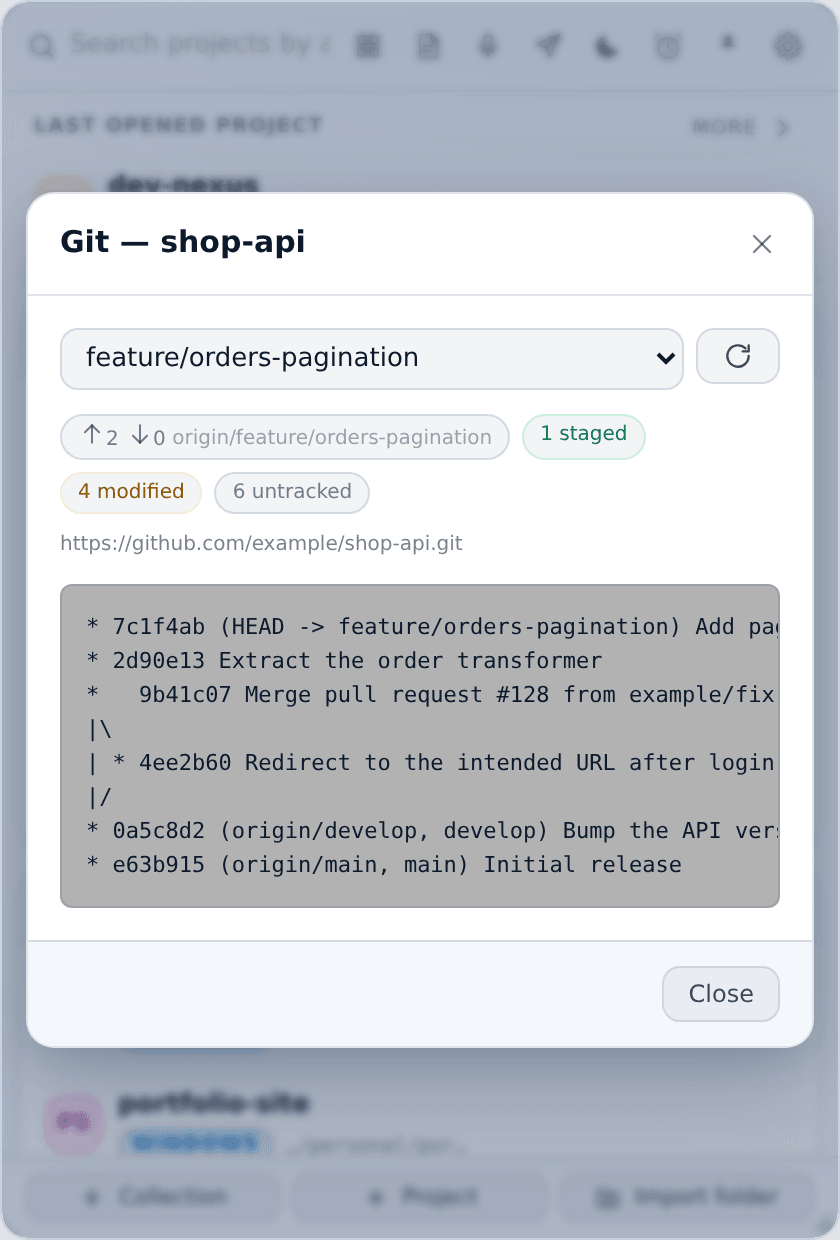
What it shows
- The current branch, as a dropdown. Pick another and XTop checks it out. The refresh button re-reads everything.
- Ahead / behind against the tracking branch —
↑2 ↓0means two commits to push and nothing to pull. - Working-tree counts as chips: staged, modified, deleted, untracked, conflicted. Only the non-zero ones appear, so a clean tree is visibly clean.
- The origin remote URL.
- The commit graph — the raw output of
git log --graph --oneline --decorate --all, rendered as-is.
WSL projects
Git runs on Windows, not inside the distro. A project kept at a WSL path is reached through its Windows path (\\wsl$\Ubuntu\home\...) automatically, so the same window works for both kinds of project with nothing to set up.
Not a repository
If the folder has no .git, the window says so and shows nothing else. That is normal for a project you keep in XTop but do not track with git — a scratch folder, a downloads folder, a design export.