
Meetings
Record a meeting, get a transcript while it is still running, and turn it into a summary with decisions and action items when it ends.
By default it all happens on your own computer: the audio never leaves it, and the transcription runs on a local Whisper server. Two things can use an online model if you choose them — the summary, and the Gemini engine — and both are opt-in.
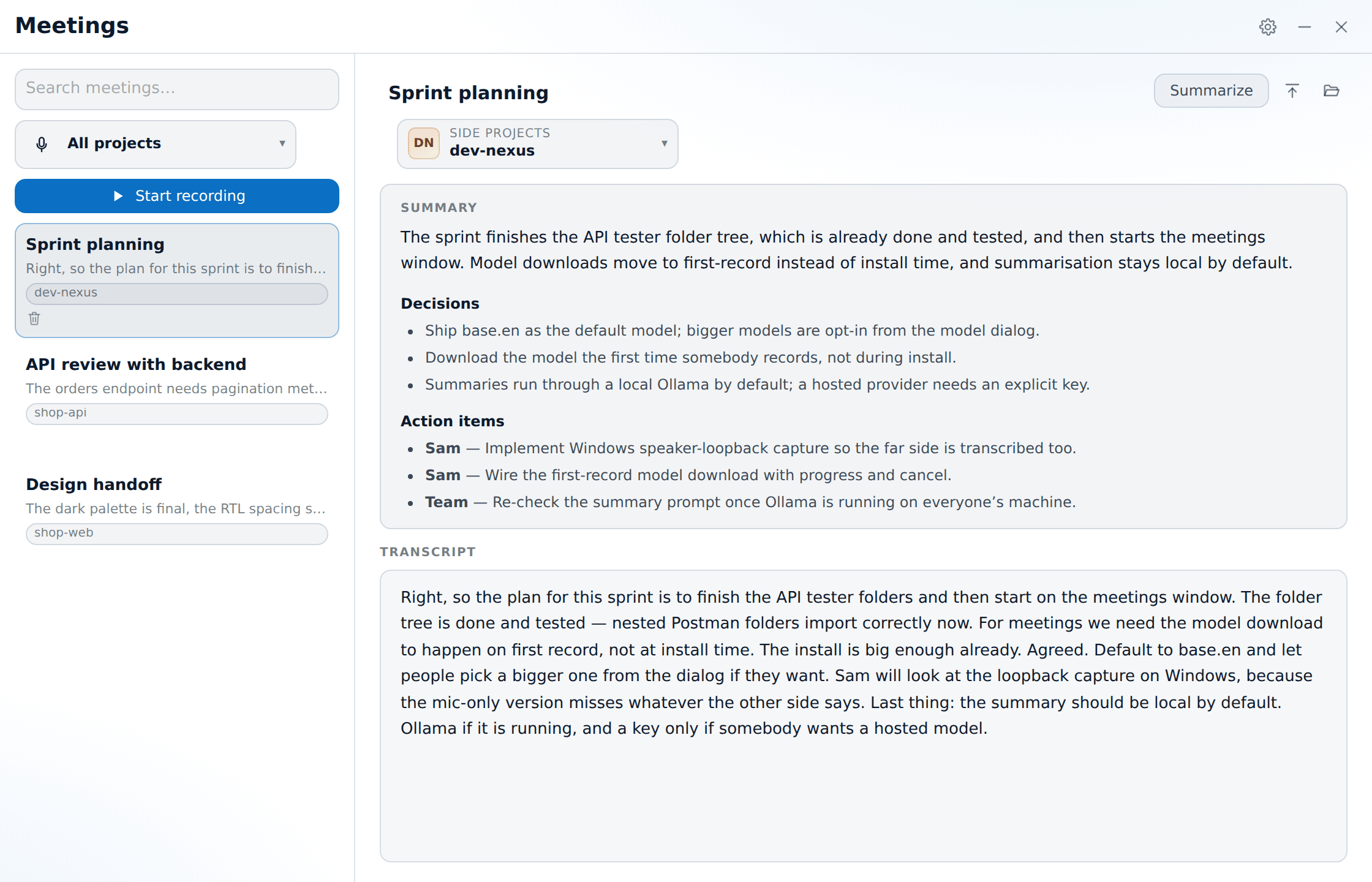
Open it with the microphone icon in the panel header. From a project row's context, it opens pre-filtered to that project.
First run: the model
Transcription needs a model, and models are big, so the installer does not include one. The first time you press Start recording, XTop downloads the default one (base.en, about 142 MB), shows a progress bar you can cancel, and starts as soon as it is ready.
To choose a different one, open ⚙ → Manage model… (also reachable from Settings → Meetings).
| Model | Engine | Size | Good for |
|---|---|---|---|
tiny.en | whisper | 75 MB | A slow machine, or English you mostly just need indexed |
base.en | whisper | 142 MB | The default — the usual balance |
small.en | whisper | 488 MB | Noticeably better on accents and crosstalk |
medium.en | whisper | 1.5 GB | The best quality, if you have the RAM and the patience |
parakeet-tdt-0.6b-v3 | parakeet | 397 MB | Faster than whisper at similar quality |
You can also browse for a model you already have, or point the app at a Whisper server binary of your own.
Keep the model path plain ASCII
Whisper cannot open a path with non-English characters in it. If your Windows user name is in Arabic, keep the models in the default folder (C:\ProgramData\XTop\models) instead of under your user folder.
Choosing an engine
There are five engines. Two come with the app, two are Egyptian Arabic models that need Python installed, and one is online.
| Engine | How it runs | Pick it for |
|---|---|---|
| whisper | A local server that stays running, and receives the audio piece by piece | The default — steady, nothing to set up |
| parakeet | A command run once for each piece of audio | When whisper cannot keep up. European languages only |
| QwenCleo-ASR | Python, mohammedaly22/QwenCleo-ASR | Egyptian Arabic, and Arabic/English code-switching |
| EgypTalk-ASR-v2 | Python, NAMAA-Space/EgypTalk-ASR-v2 | Egyptian Arabic on a lighter model |
| Gemini 3.5 Transcribe | Online, over a live connection | A slow machine. Nothing to install or download |
Engines that cannot handle the language you chose are greyed out instead of hidden — parakeet for Arabic, EgypTalk for English.
Gemini, the online engine
Gemini 3.5 Transcribe is the one engine that sends audio off your machine. There is nothing to install and no model to download, it detects the language by itself, and it does not care how slow your CPU is — which makes it the answer on a machine that cannot keep up with the room.
Paste a Gemini API key into the engine picker (there is a Get a key link). The key is stored on this PC and never leaves the app's main process.
It is also available as a third option for Improve transcript, where it finishes in minutes rather than hours.
Getting better Egyptian Arabic out of whisper
whisper hears the dialect fine. The problem is what it writes down. It was mostly trained on Modern Standard Arabic, so it "corrects" the dialect as it goes — «إحنا عايزين» comes back as «نحن نريد», or as a sentence that means something else entirely.
Priming text is how you tell it which Arabic to write. Whisper predicts what comes next, so a paragraph of everyday Egyptian at the start pulls the rest of the text towards that style. Arabic meetings get a built-in Egyptian paragraph automatically.
Priming costs CPU time. How much depends on your machine and how clear the audio is. On hard audio it can take about twice as long, because whisper thinks its own output is unlikely and tries the same piece again. On clear speech it costs much less. If the transcript starts falling behind the room and the window keeps saying it is catching up, XTop turns priming off by itself — and the Egyptian engines below are a better answer than a faster whisper.
Priming has one side effect, which the app handles for you: over silence or noise, whisper often just repeats the priming text back. Anything that comes back as the priming text, as the previous piece repeated, or as one of whisper's known junk phrases («ترجمة نانسي قنقر», "Thanks for watching" and the like) is thrown away instead of being written down.
Improving a finished meeting
The transcript you get while you talk is a compromise: it has to keep up with the room, so it uses the fast model and works on pieces of a few seconds at a time.
Improve transcript on a finished meeting works differently. It loads large-v3, the full model, and gives it the whole recording at once. That way whisper understands the meeting as a whole instead of starting fresh on every piece — which is where most of the dialect accuracy comes from. It is slower than real time on a CPU, so it cannot run live, and that is exactly why it is worth running afterwards.
Download large-v3 from the model list first. It is marked For improving only and has no Select button, because recording with it would be too slow and you would lose audio. The file is checked against its published size before use, so a download that went wrong is marked Damaged file and offered again instead of being handed to an engine that would crash on it. Your live transcript is kept next to the new one, so if the result is worse you can go back.
How long it takes. On an i7-13700H, a 25-minute meeting took about an hour at best quality — roughly two and a half times the length of the meeting, and longer on difficult audio. While it runs you get a percentage from the engine (updated every 30 seconds of audio), an estimate of the time left, and a Stop button. Closing the Meetings window does not stop it, and reopening shows the same progress. It uses all your CPU cores except two, so expect the computer to be busy while it works.
The arrow next to the button gives you the other option:
| Model | Search | Speed | |
|---|---|---|---|
| Best quality | large-v3 | two beams | ~2.5× the meeting length, or more |
| Fast | large-v3-turbo-q8_0 | greedy | several times quicker |
| Gemini 3.5 Transcribe | online | — | minutes |
Fast uses the model you already have for live transcription, so it starts right away instead of after a three-gigabyte download. It is weaker on the dialect, which is the whole point of Best. Gemini needs no model at all, but sends the recording to Google — see the online engine. You choose each time you press the button; the choice is not saved.
Two things it will not do:
- It will not run while you are recording — it loads a much heavier model and would starve the live transcript.
- Only one pass at a time. Starting a second one while another meeting is being read back is refused rather than queued.
Why the pass does not skip the silence
Because there is hardly any silence left to skip. The audio.wav file is built only from the parts where someone was speaking, so the long gaps were never saved in the first place. On a real meeting, skipping silence removed only 7.1% of the audio and took longer than it saved: 220 seconds instead of 196 for the same five minutes. It stays as a setting, for a recording that really is mostly silence.
The recording is kept
Meetings keep their audio in audio.wav next to the transcript. That is what makes the second pass possible, and what lets anything missed while transcription was catching up appear in the final text. The file holds speech only — silence between sentences is not saved — so a position in the file is not the same as a time in the meeting.
The Egyptian Arabic engines
Whisper does transcribe Arabic, but it handles the Egyptian dialect badly enough that the transcript is hard to read afterwards — which is worse than a clear error, because it looks like it worked. Neither of these two models has a GGML build, so they run through a small Python server that comes with the app (python/xtop_asr_server.py) instead of the built-in engines.
You need Python 3.10+ and the engine's own packages. The exact command is shown in the model dialog:
# QwenCleo-ASR — 1.7B, an NVIDIA GPU is strongly preferred
pip install qwencleo-asr --no-deps
pip install "qwen-asr>=0.0.6" torch torchaudio numpy soundfile huggingface_hub

# EgypTalk-ASR-v2 — much lighter, NeMo FastConformer
pip install nemo_toolkit[asr]
If your Python is in a virtualenv, use Choose Python… to point the app at it. Otherwise the app uses py -3 on Windows, or python3/python from your PATH. It tries py first on Windows because that is how these packages are normally installed, and the engine has to run in the same Python they were installed into.
When an engine will not start
Test engine in the model dialog actually loads the engine and shows you everything it printed. Use it before a meeting, not after. The small "ready" label next to it only checks that the package is installed, which a broken install still passes — something that happens a lot with pip install nemo_toolkit[asr] on Windows. If the engine fails, the last line of that output is the reason, and it is the same message you get in the meeting window.
First recording is slow
The model files are downloaded from HuggingFace the first time you use the engine — about 3.4 GB for QwenCleo. It downloads while the engine starts, and you can watch the progress in the meeting log. Nothing is added to the model list above.
Running an engine on another machine
Both Python engines can use a remote server instead. Give it the URL of a vLLM or FastAPI server (qwencleo serve, uvicorn server.app:app), or of any endpoint that takes a WAV file on POST /inference and answers with {"text": "..."} — the same thing the built-in Python server does. With a URL set, you do not have to install anything on this PC. You can save an API key next to it; it never leaves the app's main process.
What is recorded
Two sources, mixed into one mono stream:
- Your microphone.
- Your speakers — on Windows, the system audio loopback, so the other side of the call is transcribed too, not just you.
If system audio is not available, recording carries on with the microphone alone and tells you — rather than quietly capturing half the meeting.
The mixed audio is cut into pieces where people stop speaking, not on a fixed timer, converted to the 16 kHz mono WAV whisper needs, and sent piece by piece. Words that overlap two pieces are joined up, so a sentence cut in half does not come back with its middle repeated.
While it runs
- A Recording · mm:ss pill in the title bar.
- The transcript grows as segments come back.
- If transcription falls behind the audio, the window says "N segments behind". Your recording is never at risk: every piece of audio is written to
audio.wavbefore it is transcribed, so anything the live pass misses is still in the file. Being a few pieces behind is normal on a big model or a busy computer, and it catches up on its own. - If it does not catch up, the app steps in. It lowers the quality one step at a time — first the dialect priming, then a lighter model — and tells you on screen. A transcript that keeps up is more useful live than a better one that never arrives, and Improve transcript gets the quality back afterwards from the same audio. Meetings that lost pieces are marked, so you remember to run it.
- If the message becomes "Transcription has stalled", the engine has stopped altogether, not just fallen behind. The recording carries on either way — finish the meeting and run Improve transcript.
- A meeting that lost anything is marked afterwards, and the note says how much: "About 4 min of this meeting was missed live." The audio is complete, so Improve transcript brings it all back.
- The machine is kept awake for the duration, so a sleep timer cannot cut the recording short.
Pause stops recording without ending the meeting — the title bar says Paused and the clock holds. Press it again to carry on in the same meeting. Useful for a break, or for the ten minutes of small talk before anyone says anything worth keeping.
Press Stop to end it. The meeting is saved immediately, transcript and all, before any summarising happens.
Screenshots
A transcript keeps what was said, but not the slide, the diagram on the shared screen, or the error someone was pointing at. So while a recording is running, you can grab a part of the screen and save it with the meeting.
Taking one
The button is in two places:
- In the meetings window — a crop button beside Stop.
- On the island — while a meeting is recording the capsule becomes a clock; point at it and the screenshot button sits between pause and stop. See the island while recording.
Both work the same way: every screen dims, and you drag a rectangle around what you want. The size in pixels is shown while you drag.
| Action | Result |
|---|---|
| Drag a rectangle | Takes that region |
| Esc | Cancel |
| Right-click | Cancel |
| Click without dragging | Cancel — so an accidental click never saves an empty picture |
You can draw on any screen, not just the one the app is on. What you see while dragging is a frozen picture of your screens taken the moment you pressed the button, so nothing moves while you are choosing — and the island is not in the picture; it is hidden for the shot and comes back afterwards.
Where they end up
Screenshots appear as small pictures under the meeting, each labelled with how far into the recording it was taken — 04:17, not the time of day. That is what lines a picture up with the right part of the transcript.
Click a thumbnail to open it full size; × deletes it.
They are files, not blobs in a database:
<userData>/meetings/<id>/shots/1.pngExporting the meeting as Markdown adds a Screenshots section with each picture under its time. The links are relative, so an export kept in the meeting's own folder still shows its images.
Only while recording
The button only appears while a meeting is running. A screenshot is saved at a point inside a recording, so with no recording there is nothing to attach it to.
The summary
Summarize turns the transcript into three things:
- Summary — a short paragraph.
- Decisions — what was actually settled.
- Action items — each with an owner, where the transcript names one.
Providers
| Provider | Cost | Where it runs | Needs a key |
|---|---|---|---|
| Ollama | Free | Your machine | No |
| Groq | Free tier | Hosted | Yes |
| OpenRouter | Free tier | Hosted | Yes |
| Anthropic | Paid | Hosted | Yes |
Ollama is the default, because it keeps everything on your machine: give it your Ollama URL and pick a model you have already pulled. The online providers each have a Get key link, and the key is saved in the app's own data folder — not in any project, and never in something you would commit.
The archive
Past meetings are listed in the sidebar with their title, a preview, their project, and the date. Search filters the list, and the project dropdown narrows it to one project.
For any meeting you can rename it, export it as Markdown, reveal its folder, or delete it. Meetings live at:
<userData>/meetings/<id>/meeting.jsonWhen something is wrong
The window tells you the problem in plain words instead of showing an error dump. The ones worth knowing:
| What it says | What to do |
|---|---|
| The bundled Whisper server is missing | Reinstall, or point at a server binary in the model dialog |
| Choose or download a local Whisper model first | Open Manage model… and download one |
| No free local port was available | Something is holding the port range; try again |
| The Whisper server stopped unexpectedly | Recording keeps going. Press record again to restart transcription |
| The server did not finish starting | A smaller model loads faster |
| Microphone access was denied | Windows Settings → Privacy → Microphone |
| System audio loopback is unavailable | Expected on some setups — the microphone is still recorded |